Syllogistic Software Inc.

WASBuilder

An automated software development system for a single operator or small team

Agentic CodingWorkflow Automation KanbanBlue/Green Deploys Claude CodeCodex CLICopilot CLI Go

Coding agents are good at the work between a clear specification and a passing test suite. They are bad at everything around it: deciding what to build, noticing when the scope has grown, knowing when to stop and ask, and never, ever pushing to main.

WASBuilder is my answer to that. It is a Kanban board where each card is a ticket, and each column is a state in a fixed lifecycle. Agents move tickets from left to right, one stage at a time. A human writes the idea, answers the questions the agents ask, and approves the one merge that matters. Everything else is automated, and everything automated is recorded.

I use it to build my own software, including WASBuilder itself. The screenshots on this page are from a demo project seeded with example data.

The board

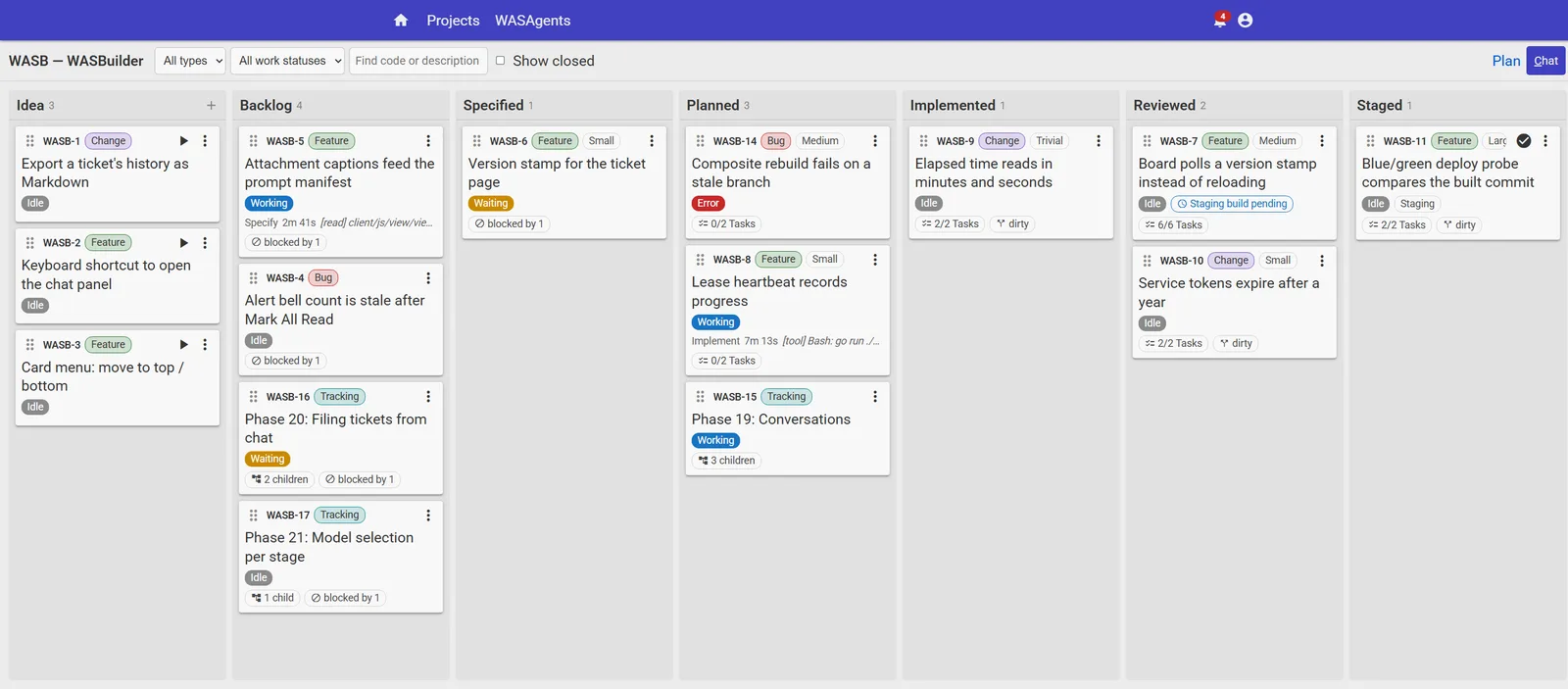
Every column is a State of the ticket lifecycle. A card shows what a human needs to know at a glance: the ticket's type and size, whether an agent is working on it right now and what it is doing, how many tasks are done, whether its branch has fallen behind main, and what it is blocked by.

The WASBuilder Kanban board with columns from Idea to Staged
Two agents are working, one ticket is waiting on a question, one has hit an error, and one is sitting in Staged waiting for a human to approve the merge.

Cards can be dragged between columns, but the state machine decides what is legal. A ticket cannot reach Implemented without a branch and a finished task list, and it cannot be merged until somebody has approved it. An illegal drag snaps back and explains why.

How a ticket moves

The lifecycle is deliberately rigid. A language model is like a person: unpredictable, and if you push it too hard for too long, it goes off the rails. So the workflow is broken into short stages with a fresh context each time, and every stage has one job and one artifact.

Idea→ Backlog→ Specified→ Planned→ Implemented→ Reviewed→ Staged→ Merged→ Deployed
A human moves it An agent moves it Needs human approval

Specify

The agent reads the idea and the code, grades the change from trivial to large, and writes a full specification. If the scope is too big it splits the ticket into children. If anything is unclear it asks first and writes nothing, because a specification written against a guess stands forever.

Plan

An implementation plan, a task list, acceptance criteria, and a test plan, all sized to the complexity grade. If the plan needs more than ten tasks, the agent is asked whether the scope is still one ticket, and it may be split before any code is written.

Implement

A loop rather than a single run. Each round syncs the branch with main, works through open tasks, runs the checks, and commits and pushes. A round that leaves tasks open simply declines to move the ticket, and the next poll picks it up again.

Final Review

A separate run reviews the branch against the specification and acceptance criteria and writes a report. Major defects each become a task and send the ticket back to Implement automatically. Minor ones are filed for a human to triage.

Stage

The branch is merged into a staging composite with every other reviewed branch and deployed to a staging environment. This is unattended: the branch earned its place by passing review, and nothing downstream depends on staging.

Merge and Deploy

The one human gate. A Staged ticket waits for as long as it takes for someone to tick Approved To Merge. Production is then a blue/green deploy with a health probe that compares the running commit against the one that was built.

The ticket page

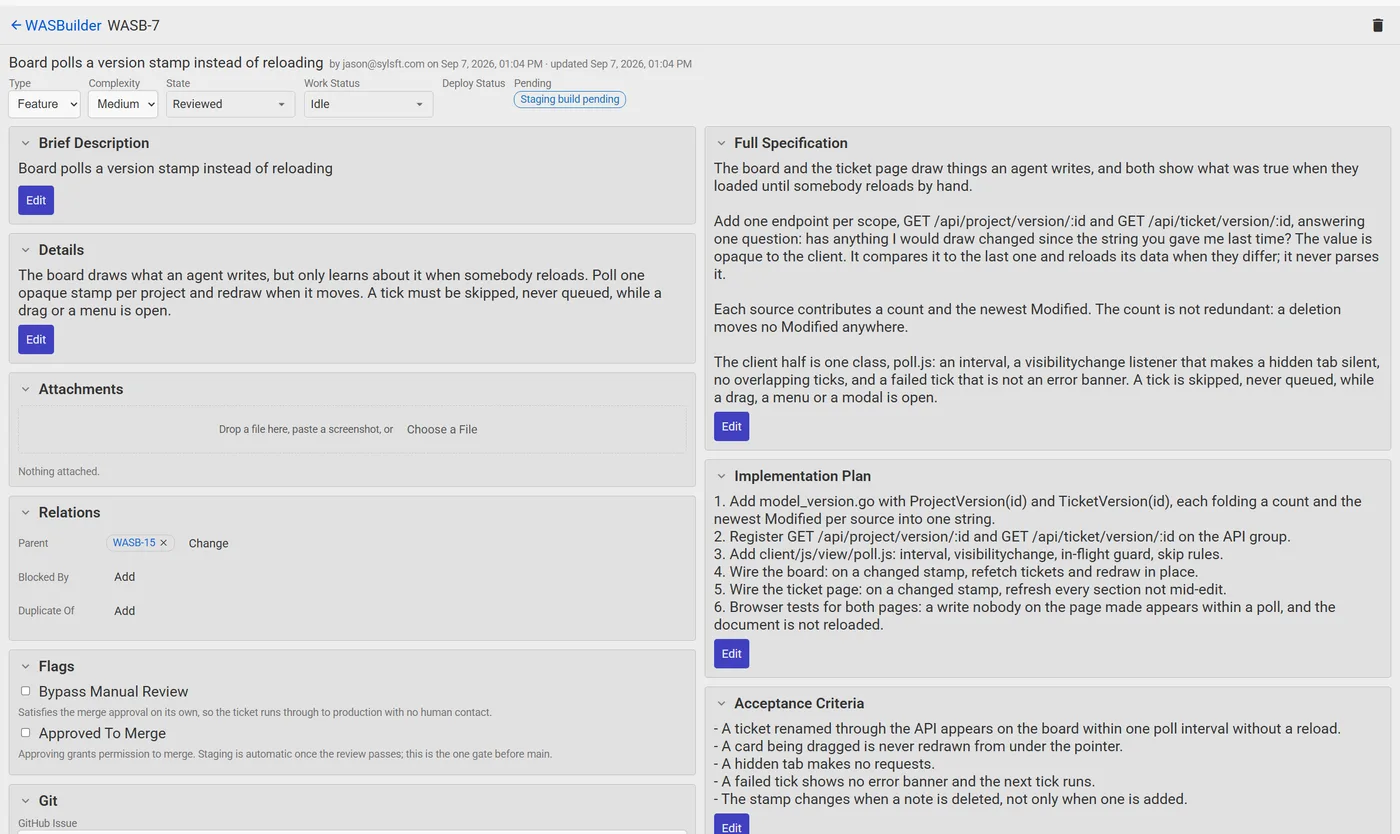
Everything an agent produces lands on the ticket, in plain text a human can edit. The specification, the plan, the acceptance criteria, and the test plan sit on one side. Tasks, defects, questions, and relations sit on the other. Editing the brief after the specification is written marks the artifacts stale, so nothing downstream quietly works from an old version.

A WASBuilder ticket page showing the specification, plan, acceptance criteria, and test plan
A ticket the agents have taken from a two-sentence idea to Reviewed.

Every run is a record

Each stage is one run of a coding agent CLI. The run records which model ran, at what effort, how long it took, the tokens in and out, and what it cost. The transcript is kept as a log, and the review report is a note on the ticket.

This is the first unbounded spend in the system, so the number is always on the screen. A conversation shows its running total in the footer, and a ticket shows what every stage cost to get it where it is.

Runs that succeed but change nothing are counted too. Three rounds in a row with no progress is a stall, and a stall is a question for a human rather than a fourth round.
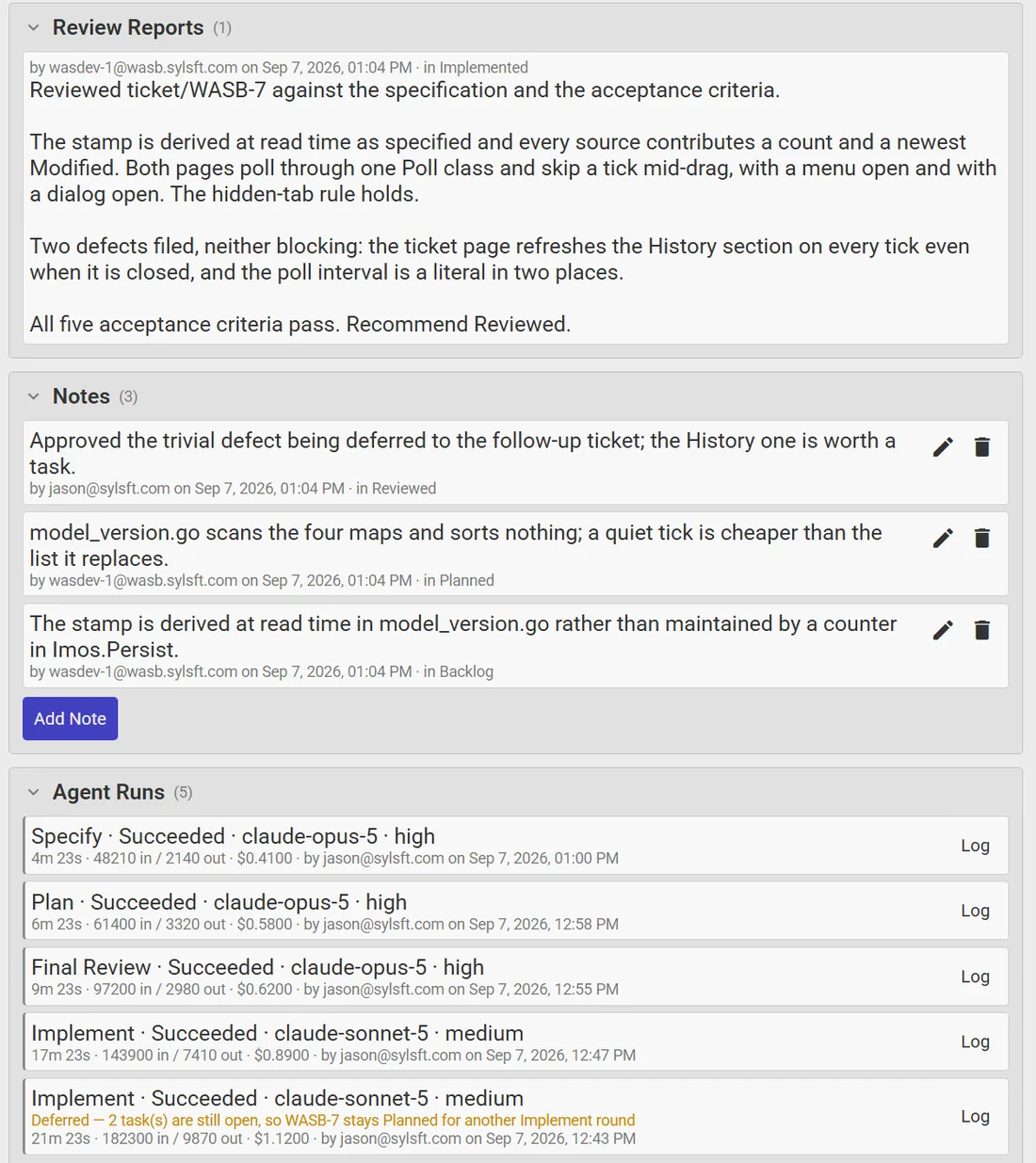
The review report, notes, and agent runs on a ticket, each run with its model, duration, tokens, and cost

Where the agents stop and ask

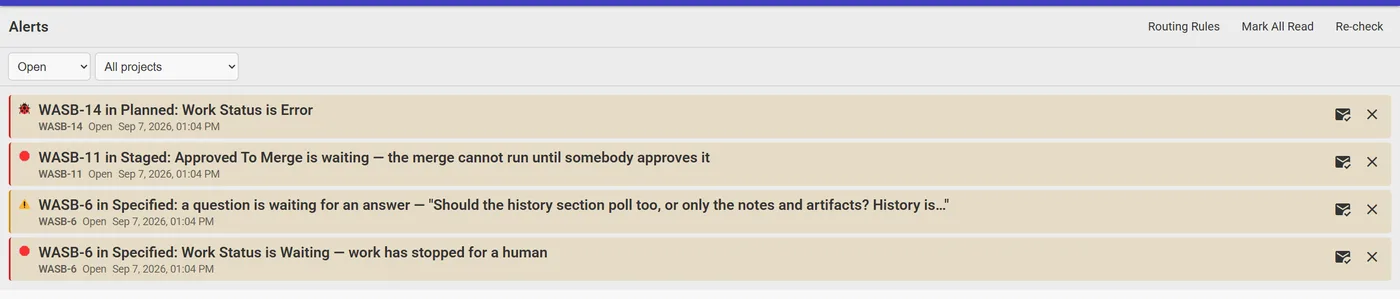
The rule is to make everything as deterministic as possible, and to escalate the rest. An agent that cannot decide something from the code or the documentation asks a question on the ticket and stops. A merge that conflicts, a task list that has grown past its budget, a deploy whose health probe fails: each one stops the ticket and raises an alert.

The WASBuilder alerts inbox listing an error, a merge waiting for approval, and an unanswered question
The inbox. Alerts arrive here, by email, or by SMS, according to routing rules you set per project and severity.

Answering the question on the ticket releases it, and the next poll carries on from where the agent left off. While a run is in flight, the card and the ticket show the stage, how long it has been at it, and the last line the agent said. Two minutes of silence on a screen reads as a hang, so the heartbeat carries progress.

A ticket header showing the agent's current stage, elapsed time, and the last thing it said

A conversation over the board

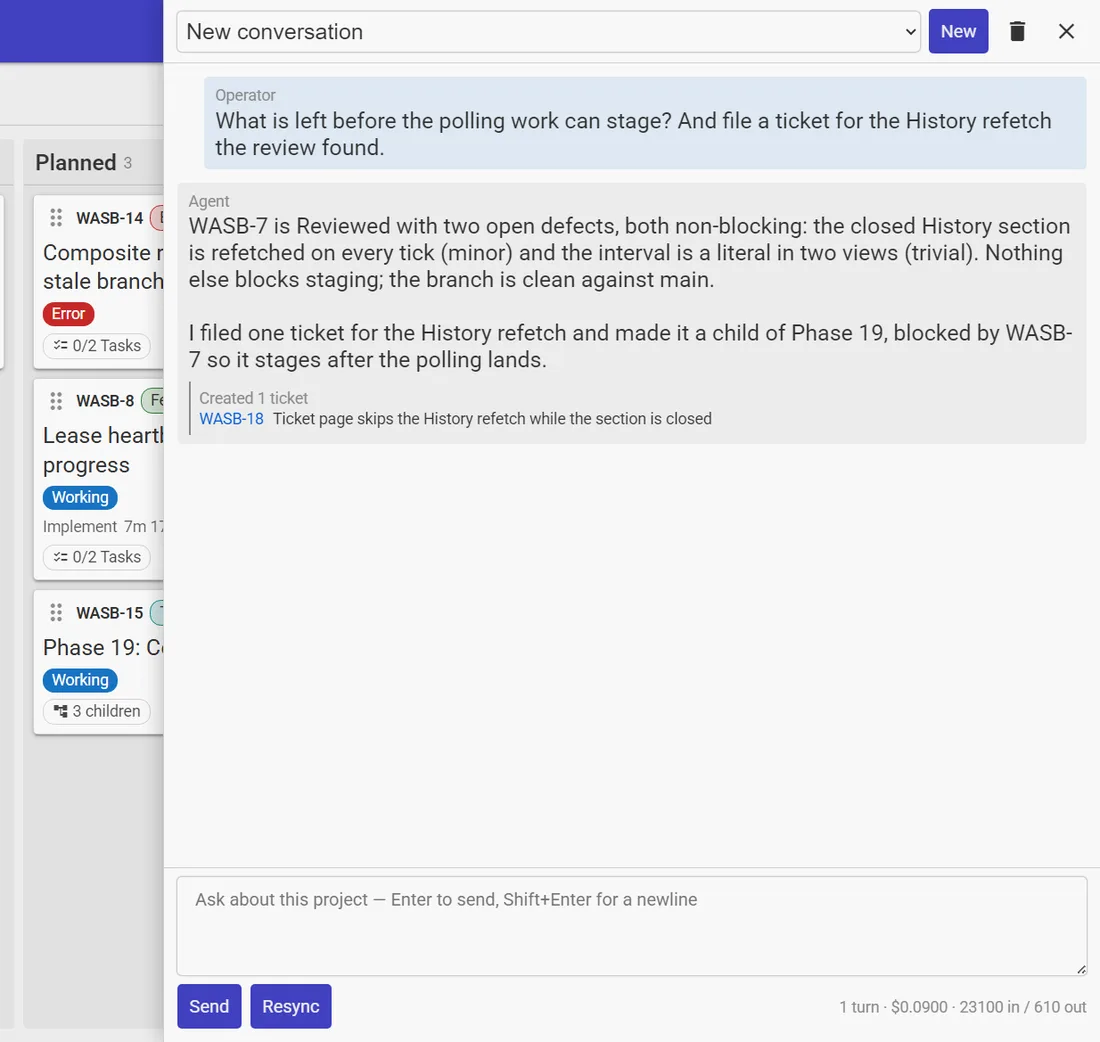
The chat panel opens a conversation about the project, answered by an agent with the repository checked out. It knows every open ticket, so you can ask what is left before something can ship, or why a build failed.

It can also file tickets. A turn that decides the work is four tickets, two of which have to happen in order, files all four with the parent and blocking relationships in place. The tickets appear on the board behind the panel on its next poll, and each one links back to the conversation it came from.

The chat panel over the board, with an agent reply and a ticket it filed

The fleet

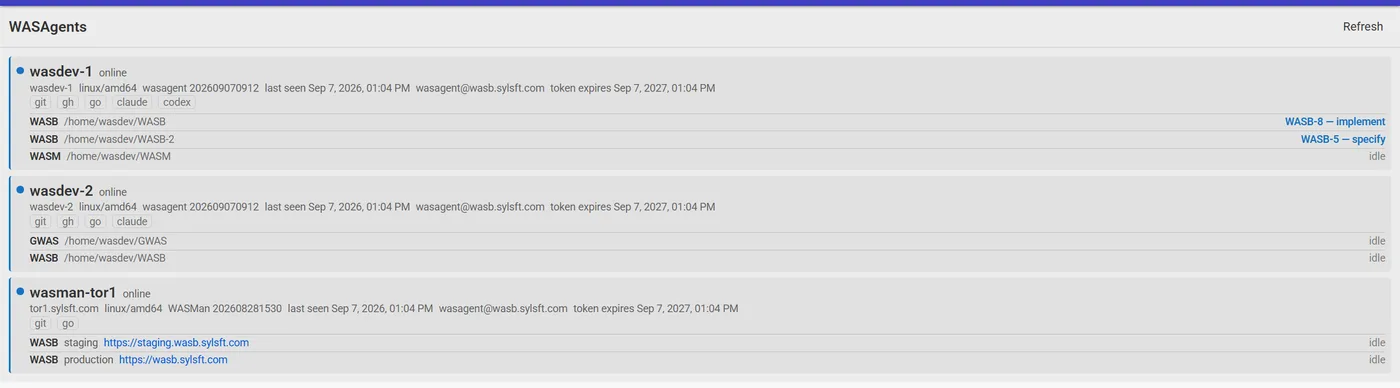
WASBuilder owns the data model and enforces the state machine. It never runs a coding agent itself. The work is done by a small fleet of programs that poll it for leases.

WASAgent

A coordinator that runs 24/7 inside an isolated environment, announces itself and its checkouts, and takes a lease on the next eligible ticket. One lease per checkout, and one checkout at a time, so two runs can never edit one working directory.

WASDev

A short-lived virtual developer, spawned per run under a low-privilege user. It fetches the work order, drives the coding agent CLI, heartbeats progress, and reports the result document back. If it goes silent, its lease expires and a human is told.

WASMan

The deploy manager. It holds the environments, hosts, ports, and databases that WASBuilder deliberately knows nothing about. It takes the staging and production deploy leases and reports what it deployed and whether the probe passed.

The WASAgents page listing two virtual developer hosts and a deploy manager, with each checkout's current work
Two WSL distros running virtual developers, and a VPS holding the staging and production instances.

Isolation is the real boundary. A virtual developer runs in a WSL distro or a VPS with no access to the host filesystem, a git credential that cannot push to main, and server-side branch protection to back that up. The coding agent is granted a shell, which is trust rather than a sandbox, so the environment is what makes it safe.

Agents authenticate as service accounts with tokens that expire after a year, and the fleet page warns thirty days out. Every write an agent makes is attributed to its account, and disabling the account revokes the host.

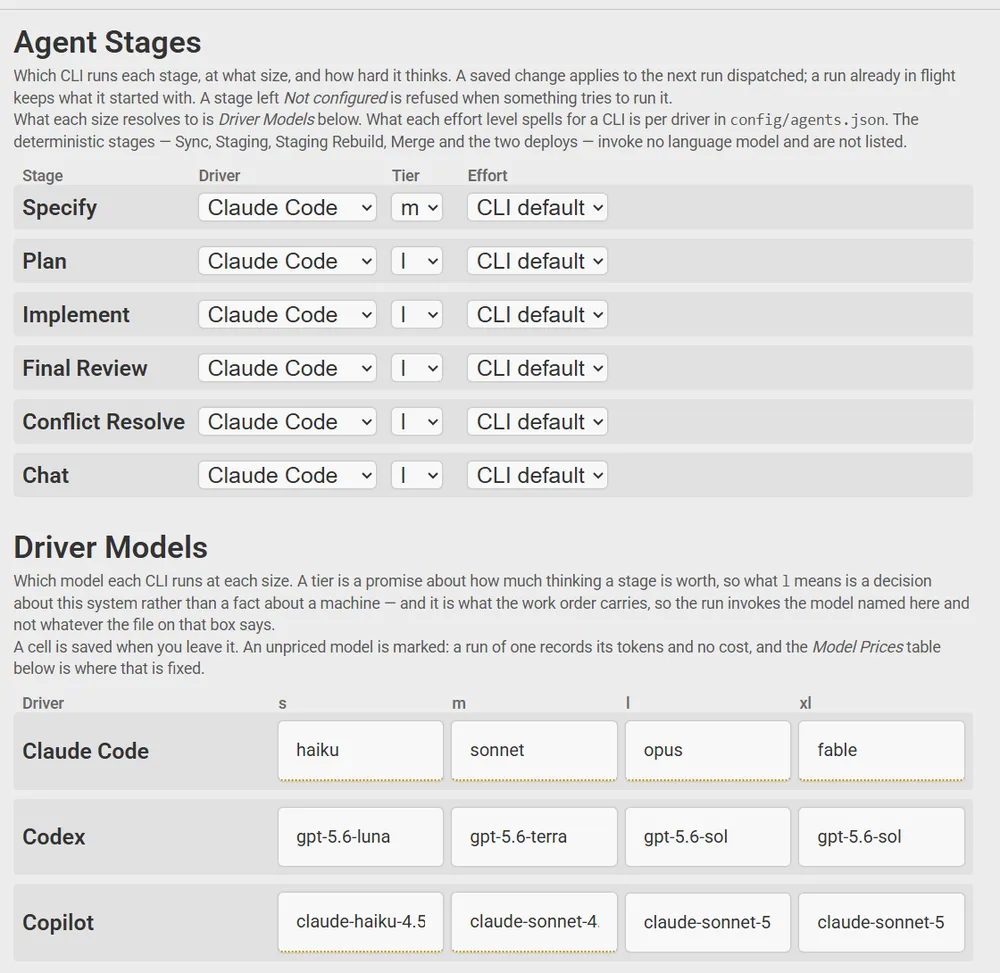
The Settings page: which CLI and model size runs each stage, and which model each size maps to per driver

Which model, for which stage

Each stage is configured with a driver, a size, and an effort level. Specify and Plan get a large model thinking hard, because a mistake there is repeated by every stage after it. Implement can run on something faster and cheaper.

The size is a promise about how much thinking a stage is worth, and what each size means for each CLI is a separate table. The decision travels on the work order, so what the settings page says and what the run invokes cannot disagree.

A price table turns tokens into dollars for the CLIs that do not report a cost themselves. A model nobody has priced is marked as unpriced rather than shown as free.

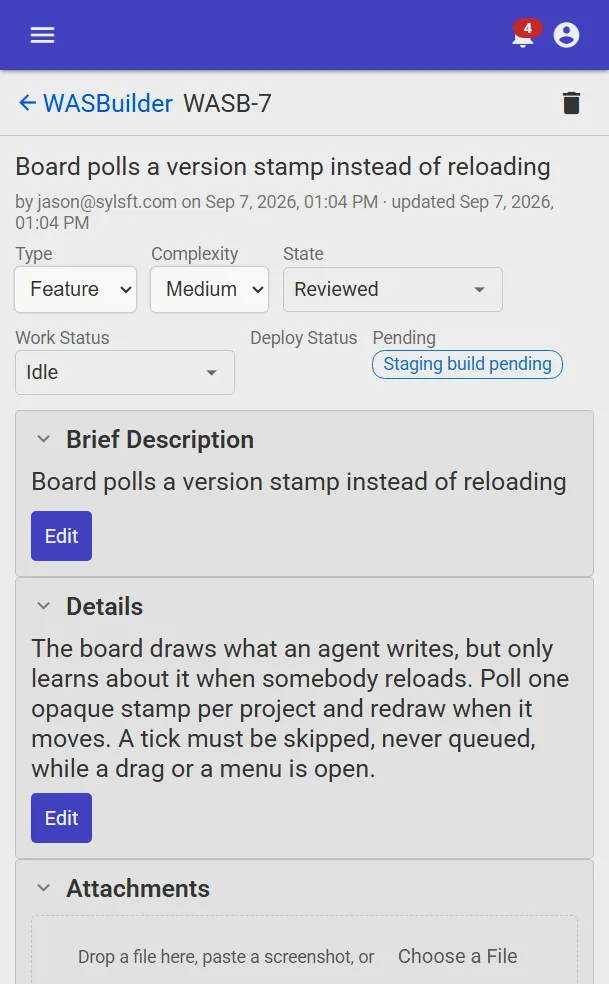
Built to be run from a phone

Most of what a human does in this system is read a question and answer it, or look at a review and tick a box. That happens wherever you are, so every page works on a phone, and the alerts can reach you there.

The whole thing is Go with a plain HTML, CSS, and JavaScript frontend. No build step, no bundler, and no framework beyond a small one of my own. The browser tests drive a real headless Chrome against the real server, and a run of the checker is the gate for every change, including the changes the agents make.

A WASBuilder ticket page on a phone

What I learned building it

  • Ask first, write second. A stage that asks a question and also writes its artifact against a guess produces an artifact nobody revisits. The answer always arrives too late to matter.
  • Short runs, fresh context. One stage per run keeps the model sharp and makes a crash lose one stage rather than a day of work.
  • Make the boring parts deterministic. Syncing a branch, merging, building the staging composite, and deploying are git and shell, not judgment. None of them invoke a model.
  • The server decides what is legal. Result documents are parsed and validated on the server, never trusted from the client. The state machine is the only description of what a ticket may do.
  • Watch the money. Every run records its cost, and a stall stops the spend before a fourth identical round.

Want something like this?

WASBuilder is an evolving system and I am happy to talk through what has worked and what has not. If you are trying to get coding agents working reliably on your own codebase, that is a conversation worth having.

Send me an email: contact@sylsft.com

Sign in

or

or
Sign up

or
Account
Change email address:
Enter current password:
Change password: (blank to leave unchanged)